|
|
|
|
Steps for Publishing Your Textbooks |
- Make sure that you are writing them in an acceptable
format. Most people use the standard 8 ½
by 11 page format in Microsoft Word. The pages
are printed double sided, so if you want blank backsides
you must include blank pages. You may want blank
backsides if students need to remove pages and turn
them in. If using Word please use the following fonts
or be prepared to provide any additional fonts used.
Arial, Book Antiqua, Bookman Old Style, Century, Courier,
Garamond, Palatino ,Tahoma, Times New Roman, Verdana,
and Symbols.
- Properly made pdfs will also work. Use THIS
file to create pdfs in adobe acrobat. If creating
your pdf in Word under options select ISO 19005-1
Compliant (PDF/A).
- Include a copyright page. This page simply
needs to specify if all rights are reserved and who
holds the copyright. See example below.
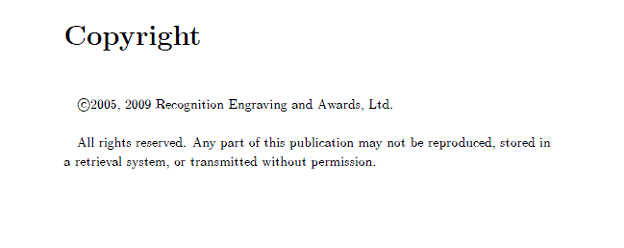
- Please provide the text to be included on the cover. A tasteful full-color cover will be designed for your textbook using the text you have provided.
- Do you want perfect bound (soft back textbook) or spiral bound? Hard bound is available, but it is quite a bit more expensive and requires a different page format.
- The default is for black and white interior pages, but color is available. Color is substantially more expensive.
- Let us know if you want us to include a royalty for
either yourself or your department, and how much that
royalty should be per book. (textbooks@awardshere.com).
- We will let you know when your textbook is ready for ordering.
- Let us know if you need a desk copy, and where to send
it. Desk copies may only be ordered if the textbook
is required in the course. (textbooks@awardshere.com).
- Order the textbook for your class as normal. There is no ISBN number, but the bookstore can get all the information they need at http://www.reatextbooks.com/bookstores/bookstores.html
|
|
|
|
|
Information |
|
Prices are based on usage levels as well as bookstore returns and edition change frequency.
|
|